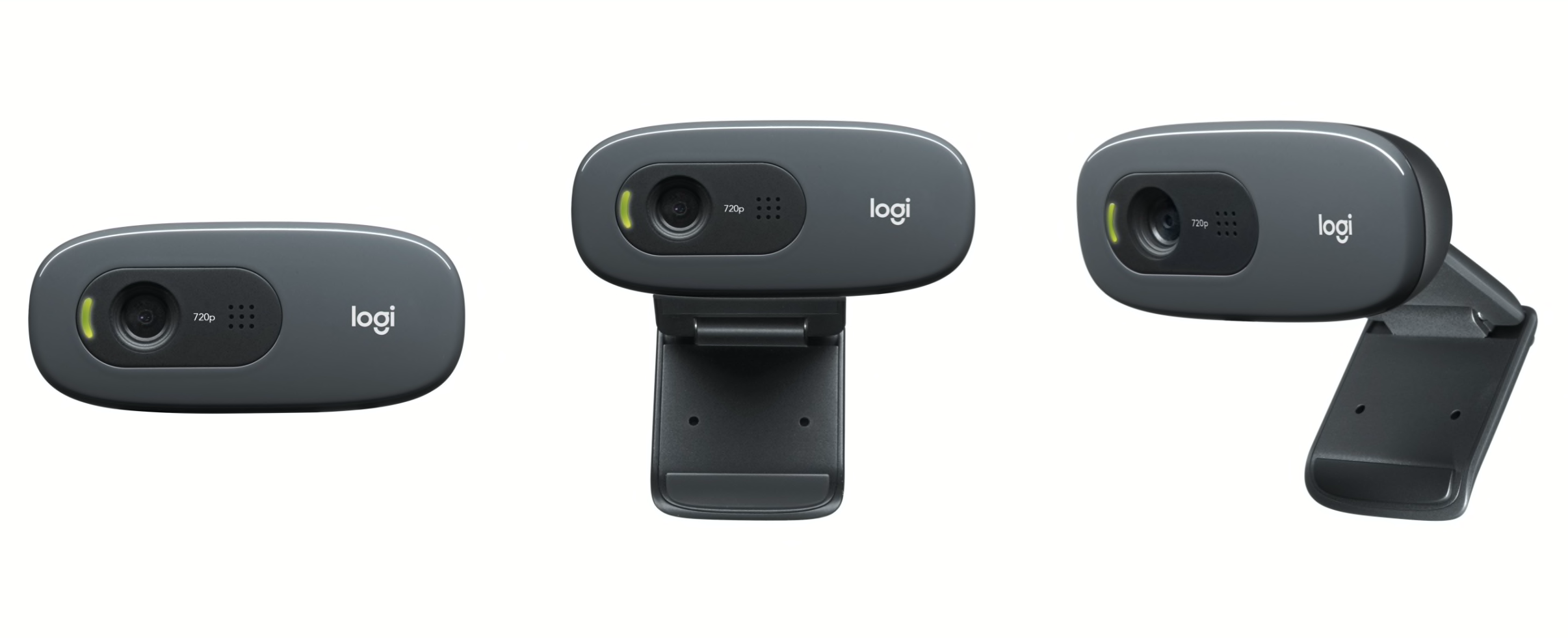
USD 39.99
test
C270 Dark Grey

HD 720p video calling that’s simple.

Call in HD

Enjoy widescreen HD 720p video calls on most major IMs.

Watch the video

Smile

Smile

Your friends and family will see you in lifelike detail with 3-megapixel photos.*

Speak out

Speak out

You can be heard loud and clear thanks to a built-in microphone that reduces background noise.

* Software enhanced.
Design inspiration for the following are courtesy of Vector Portal: Pink Balance

HD Webcam C270

HD 720p video calling that’s simple—on most major IMs, including Logitech Vid™ HD.

HD video calls

HD video calls

You’ll get HD 720p video calling on most major instant messaging applications.

3-megapixel snapshots

It’s easy to take snapshots when you don’t have time for a video call (software enhanced).

Megapixels? Sensor? Why is image quality so important?

Built-in mic with noise reduction

It gives you clear conversations without annoying background noise.

Find out why RightSound sounds so good.

Automatic light correction

It automatically adjusts the image during your call, so you look your best even in dim light.

Learn more about RightLight™ technology.

IM compatibility

IM compatibility

Works with Skype™, Windows Live™ Messenger, Yahoo!® Messenger, and other popular instant messaging applications.

Smoother. Sharper. Richer. Clearer.

Logitech Fluid Crystal™ Technology. It’s what makes a Logitech webcam better. It’s smoother video, sharper pictures, richer colors and clearer sound in real-world conditions.

Read more about Fluid Crystal.

Logitech HD webcams. High-def yourself.

Perfect for YouTube  

Your webcam is more than just another gadget. And it’s why your old (non-HD) webcam and the built-in webcam in your computer just won’t cut it.

Why? What other device lets you look your loved ones in the eyes and tell them how you feel, tell them a joke, tell (and show) them what your three-year-old just created out of cardboard, glue and glitter?

Sharing, socializing, connecting with the people you care about. That’s what makes a webcam different. 

And Logitech HD webcams are about sharing your life—but bigger, better, brighter, smoother.

High-def yourself. 


See how easy it is to upload HD videos to Facebook™ and YouTube™ .

See all Logitech HD webcams.

Say it bigger. Say it better.

The beauty of video calling over, say, the phone, is that you can see and hear your loved ones.

But until just recently you couldn’t make an HD video call. Because the name of the game in video calling is crunching down millions of pixels—the smallest unit of a digital image—every second and sending it from your computer, over the Internet, and to your buddy. 

Up until now, bandwidth and CPU constraints made HD video calling impossible for nearly all PCs (desktop and laptop) connecting to the Internet through traditional networks.

That’s all changed.

So go ahead. HD yourself. With a Logitech HD webcam.


See all Logitech HD webcams.

Even more than resolution

RightLight™ technology. Look natural. Even when you don’t have natural lighting.

Web calls get real

A webcam makes it feel like you’re right there with your family and friends—no matter where they are. But low-light or a bright window in the room can leave you looking silhouetted or surround your face with ghostly bright lighting.

If you don’t live in a perfectly lit world, we’ve got just the thing for you.

Logitech® RightLight™ technology is a system of hardware and software that helps you look more lifelike in all kinds of lighting.


See all webcams with RightLight™ technology.

Lighten up

Webcams and low light generally don’t get along. That’s why RightLight technology includes CMOS sensors that more precisely measure and maximize the light in any situation. Whether your face is shadowed or the whole image is dark, poorly lit areas will appear brighter and have more detail.

Goodbye, orange skin

Bright colors are pretty. Unnaturally saturated skin? Not so pretty. So we pay careful attention to how our webcams with RightLight technology reproduce light and dark skin tones. We adjust the camera’s color hues and saturation so your skin looks natural, not orange.

Many webcams aren’t so good to your skin. They prioritize bright colors—which can make your face look overly saturated. If you prefer the saturated look, you can easily boost the colors with Logitech QuickCam software.

The true you

Not into the fun house look? Have no fear.

While many webcams can leave you looking too long or too wide, our webcam lenses are rigorously tested to make sure they don’t have noticeable distortion. And that means you look like you—in just about any light.


See all webcams with RightLight™ technology.

RightSound technology. So you sound like—you.

What’s that noise?

Have you ever made a video call and thought that the person on the other end sounded unusual? That their voice was unnaturally flat? Or there was a strange distortion in their speech?

Webcams let you see and talk to your friends and family—wherever they are. But with most webcams, you need to wear a headset or distracting background noise (the whir of a fan, the hum of your computer) can mar your conversation.

At Logitech, we hear that sound, too. And we know it’s annoying. That’s why we developed RightSound™ technology—to help ensure that your voice comes through crisp and clear.

See all webcams with RightSound™ technology.

Say good-bye to that humming sound

Try this. Stop reading for a moment and just listen to the sounds in your room. (We’ll wait.)

Now, think about all the different sounds you hear. You can probably categorize them into two types: sounds with a regularly repeating pattern (like a fan, air conditioner, or your neighbor’s lawnmower) and sounds that vary (like the human voice). Engineers would call the first type ‘stationary sound’ and the second ‘non-stationary sound.’ Ambient noise is another way to describe the first type of sound.

Ambient noise—such as the hum of your computer—is what can really spoil your video call.

Fortunately, ambient sound waves produce a regularly recurring pattern. And because they do, we can identify the ambient noise in the midst of all the other sounds in the room, including your voice, and help make it less of an annoyance. In a nutshell, that’s what RightSound does.

RightSound. Real difference.

There’s a lot of talk about megapixels when it comes to webcams. But we know that a satisfying video call requires good sound quality, too.

At Logitech, a team of acoustic engineers created RightSound. Using sophisticated algorithms,, we carefully analyze the entire spectrum of sound to better isolate the ambient noise, and more deftly cancel it out with a signal below the threshold of human hearing.

The result is that your friends and family only hear the real you. Loud and clear.

See all webcams with RightSound™ technology.

MAGIX photo organization and video editing software. Easy, smart and free with your Logitech webcam.*

You’ve said good-bye to shoeboxes full of photos and videocassettes. Now all your memories are stored on your computer.

But with thousands of photos and videos, it can sometimes be difficult to find the one you want. And once you’ve found it, you might want to crop a photo to focus on your beautiful baby cousin’s face. Or cut those last few seconds of video where your sister’s perfect wedding cake somehow ends up on the floor.

You need software that gets you organized and helps you fix minor blemishes in your photos and edit your videos.

But you want it to work right the first time—and you don’t want to spend hours reading a manual to figure it out.

We understand. That’s why Logitech has teamed up with MAGIX to offer MAGIX™ Photo Manager 9 and MAGIX™ Video Easy with your new Logitech webcam. And they’re free.*

You’ll find icons for each of these programs in the Get More Apps section of your Logitech Webcam Software.

Sound good? Get MAGIX Photo Manager 9 and MAGIX Video Easy now. 

Or let us tell you a bit more about what MAGIX can do for you.


Magix
Get Hollywood  

Get Hollywood.

Using a webcam to record a video of your baby’s first words, a funny clip that you upload to Facebook™ or YouTube  or a warm message to a loved one can be an art. It’s hard to figure out just when to stop—or start—recording to get the best video.

There are editing programs out there, but they’re often very complicated, taking days to learn and offering lots of features most people will never use.

That’s where MAGIX Video Easy comes in. The name says it all.

This drag-and-drop home video tool makes it easy to cut, edit and combine videos to turn fleeting memories into indelible moments you’ll be able to return to again and again.

The simple, easy-to-use interface makes editing an intuitive process rather than a chemistry project. Step-by-step instructions help you select the parts of your video that you want to include, then add a title and some music—you can even add transitions.

And when your inner auteur is satisfied, it’s easy to upload your newest creation to YouTube. Next stop: Sunset Boulevard. Or Grandma’s living room.


Get organized.

Digital cameras and camera phones make it easy to capture the important moments in your life.

The question, then, is how to make those photos and videos easy to find and share with your friends and family? MAGIX Photo Manager 9 does it all for you.

After you’ve downloaded and installed the software on your PC, just connect your camera. Photo Manager will automatically import your photos and videos, and then organize them by date, time and place taken.

It’s a snap to find just what you want—without the hassle of scrolling through thousands of thumbnails.

Photo Manager also lets you do basic editing like cropping, eliminating red-eye and making small color corrections. In just a few minutes, your photos will be looking their best—just like the memories they capture.


Get organized
Get it now  

Get it now. (Because they’re free.)

The best part? Both Photo Manager and Video Easy are free with your new Logitech webcam.

Just launch the Logitech Webcam Software, click on the Do more button and choose to download and install MAGIX Photo Manager 9 and MAGIX Video Easy. You’ll be ready to roll in just a few minutes.

So what are you waiting for? Get MAGIX Photo Manager 9 and MAGIX Video Easy now.

* MAGIX is free but does require an e-mail registration.
** MAGIX Photo Manager 9 and MAGIX Video Easy work with Microsoft Windows® XP, Windows Vista® and Windows® 7.

Image quality. It’s more than just megapixels.

Seeing the smile on your grandson’s face or the glitter off your daughter’s engagement ring is so much better than a phone call. And a webcam can really make these experiences possible, even when you’re separated by thousands of miles. But getting the right webcam is more than just a matter of finding the one with the most megapixels.

At Logitech, we’re not just trying to dazzle you with more megapixels. Megapixels are only part of the picture. Image quality—especially when it comes to making a video call—depends on at least five things: the webcam lens and sensor, your computer, your Internet connection, and the video-calling program.


The truth about megapixels

A higher-megapixel sensor doesn’t equal high-quality images on its own, so it’s important not to just look at megapixels and forget about the other aspects of the camera.

Higher-megapixel sensors, however, can give you more fine detail. Pick one of our webcams with a true two-megapixel sensor and you’ll enjoy sharper, more detailed photos.

The right lens

The lens is what captures the light that gets turned into the image by the sensor. If your lens isn’t good, it doesn’t matter how many megapixels you’ve got. A bad lens is going to give you a bad image.

From our budget models to the top-of-the-line, we’re committed to using quality lenses. Our lower-priced cameras feature multi-element, plastic lenses perfectly paired for the sensor in the camera. In our mid-price webcams, you’ll find glass lenses that produce even sharper images.

For our best webcams, we teamed up with Carl Zeiss®—a pioneer in the world of optics—to create lenses that raise the bar for image quality. They use glass instead of plastic and have five elements to give you more detail and clarity and less distortion.

Find out more about why our collaboration with Carl Zeiss benefits you.


Maintaining focus

Ready for your close-up? You’re not only going to need a good lens—you’re going to need a good focusing system. A lot of webcams have either a manual focus option or no focusing system at all. If you get too close, you can end up fuzzy.

Our top webcams feature an advanced autofocus system. You’ll get crystal clear images and fluid transitions whether you’re moving in for a kiss or your kid is holding her latest masterpiece up to the camera—as close as 10 centimeters away.

Learn more about Logitech autofocus.

What about HD webcams?

When it comes to video calls, the maximum resolution is 640-by-480 pixels, otherwise known as VGA resolution. Today, you can’t make an HD video call on any of the free instant-messaging applications.

So what’s the value of an HD webcam? Want to record a message to a friend? Update your blog with a video clip? Capture your latest dance moves and post it on YouTube™? An HD webcam can record HD video. And several Logitech webcams make it easy to capture HD video at the 720p standard.


See all webcams that can capture HD video.

Find out why Logitech HD webcams offer so much more than HD.

Power and connections

Most computers sold today have no problem handling a video call. But if your computer is a little bit older or you’re not using a fast connection, you might run into difficulty. To get good clarity and smoothness, your computer needs to meet the minimum requirements to support a video call.

We recommend that your computer have a dual-core CPU with 1 GB of RAM and that you’re using a broadband connection of 256 kbps or higher. (Most broadband connections are at least twice as fast as 256 kbps.)


System Requirements

  • What you need:
    Windows Vista®, Windows® 7 (32-bit or 64-bit) or Windows® 8

  • Basic requirements:
    • 1 GHz
    • 512 MB RAM or more
    • 200 MB hard drive space
    • Internet connection
    • USB 1.1 port (2.0 recommended)


  • For HD 720p video calling and HD video recording:
    • 2.4 GHz Intel® Core™2 Duo
    • 2 GB RAM
    • 200 MB hard drive space
    • USB 2.0 port
    • 1 Mbps upload speed or higher
    • 1280 x 720 screen resolution


Warranty Information

  • 2-year limited hardware warranty

Package Contents

  • Webcam with 5-foot cable
  • User documentation

Part Number

  • PN 960-000694

Technical Specifications

The specs:
  • HD video calling (1280 x 720 pixels) with recommended system
  • Video capture: Up to 1280 x 720 pixels
  • Logitech Fluid Crystal™ Technology
  • Photos: Up to 3.0 megapixels (software enhanced)
  • Built-in mic with noise reduction
  • Hi-Speed USB 2.0 certified (recommended)
  • Universal clip fits laptops, LCD or CRT monitors

Logitech webcam software:
  • Pan, tilt, and zoom controls
  • Video and photo capture
  • Face tracking
  • Motion detection 


 Software features and offerings subject to change.
Additional services require Internet access and registration.
Some photographs are simulated.

Works with most instant messaging applications.

  • Buy two TV Cam HDs and Save $50

    Skype now comes to life on your TV Learn More

    Webcam Support

    Get the support you need to get the most out of your Logitech webcam. Logitech online resource can help with everything from installing or re-installing your software to updating drivers. Learn more