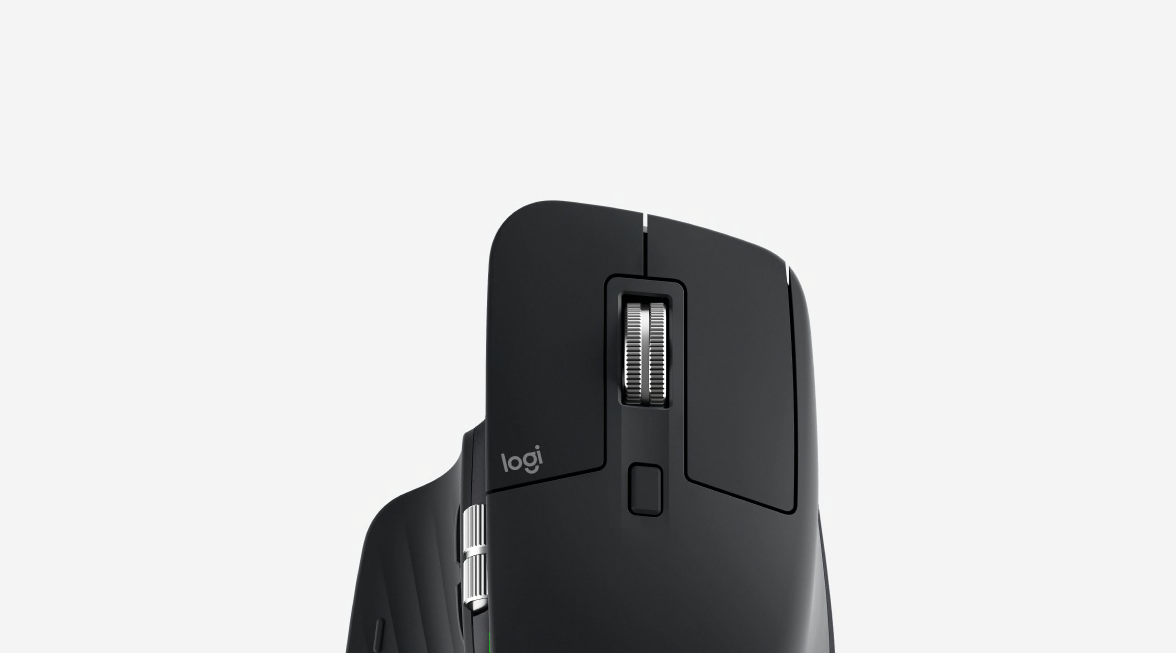
Logitech Wireless Mouse M525
Paduan sempurna antara kinerja, presisi dan harga.
Scroll wheel untuk kontrol ekstrim
Wheel inovatif kami dengan presisi tingkat mikro kami hadirkan alur lebih per milimeter, menghadirkan pengalaman navigasi tak tertandingi.
Dirancang sesuai bentuk tangan
Desain bentuk ergonomis dan pegangan karet lembut menghadirkan kenyamanan yang tiada duanya.
Kinerja bertahun-tahun
Nikmati daya tahan baterai hingga tiga tahun.* Begitu mudah dan tidak repot, bahkan Anda akan lupa sedang menggunakan baterai.
Daya tahan baterai bergantung pada pola penggunaan user dan kondisi pengaturan komputasi. Kunjungi www.Logitech.com/MouseBattery untuk informasi selengkapnya mengenai bagaimana kami menguji daya tahan baterai mouse.
Untuk Anda yang menginginkan paduan sempurna antara kinerja, presisi dan harga. Dilengkapi dengan scroll wheel berpresisi mikro untuk menyediakan pengalaman navigasi online tak tertandingi diiringi dengan bentuk ergonomis.
Scroll wheel dengan presisi mikro
Alur lebih per milimeter, scroll wheel terbaru kami menghadirkan pengalaman navigasi yang tak tertandingi. Penelusuran web yang panjang menjadi lebih cepat dan mudah.
Bentuk ergonomis
Desain bentuk ergonomis dan grip karet lembut menyediakan kenyamanan natural bagi tangan Anda, serta bentuknya yang kompak memudahkannya untuk dibawa kemanapun Anda pergi - di rumah, kantor, atau dimanapun.
Tangan yang nyaman suka dengan mouse yang nyaman. Learn more.
Daya tahan baterai hingga 3 tahun*
Dengan baterai berkinerja terlama, Anda bahkan dapat lupa untuk mengganti baterai yang ada. Plus, mode sleep yang cerdas membantu menghemat penggunaan daya dan adanya indikator lampu akan menjadi petunjuk daya.
Daya tahan baterai lebih lama? Kami pun juga. Pelajari lebih lanjut.
Receiver Logitech Unifying
Receiver mungil dapat menghubungkan hingga 6 perangkat Unifying yang kompatibel. Tambahkan keyboard, bertukar-tukarlah model mouse favorit sesuai selera gaya hidupmu. Semuanya dapat dilakukan tanpa perlu mengganti nano receiver ataupun mengorbankan port USB lainnya.
Konektivitas wireless Logitech Advanced 2.4 GHz
Anda dapat menikmati keandalan layaknya menggunakan kabel dengan koneksi wireless yang penuh kebebasan dan nyaman. Transmisi data lebih cepat dan tidak ada jeda atau koneksi terputus.
Logitech Advanced Optical Technology
Presisi tingkat laser dapat digunakan di hampir semua permukaan - seperti permukaan licin dan mengkilap** - yang menjadi kendala utama bagi mouse optikal standar. Semuanya dilakukan dengan menggunakan daya yang rendah sehingga daya tahan baterai menjadi lebih lama dan lebih nyaman.
Pelajari lebih lanjut mengenai tracking Logitech® Laser-grade.
Navigasi halaman back/forward
Untuk memudahkan penjelajahan website favoritmu, Anda dapat menggerakkan tilt wheel ke kiri atau ke kanan untuk navigasi halaman mundur (backward) atau maju (forward).***
* Daya tahan baterai bergantung pada pola penggunaan user dan kondisi pengaturan komputasi. Kunjungi Logitech.com/MouseBattery untuk informasi selengkapnya mengenai bagaimana kami menguji daya tahan baterai mouse.
** Sensor optikal tidak berfungsi di permukaan gelas atau kaca. Jika Anda mencari mouse yang dapat berfungsi di permukaan gelas, lihat disini.
*** Tilt wheel tidak mendukung fungsi backward/forward pada komputer Mac® namun mendukung Dashboard, Exposé® atau Spaces® (dipilih di System Preferences).
Hyper-fast scrolling
One spin is all it takesScroll. Lift finger. Repeat. And repeat. And repeat. |
Scroll a lot?Your spreadsheets and documents are getting longer. Your digital photo and music libraries are bursting at the seams. And you’re glued to long Web pages that have you scrolling and scrolling and …. To get through it all, you’re doing a whole lot of scrolling. We’re talking 26 feet of it in your average eight-hour day, according to a Logitech study. |
From zero to line 10,000 in 7 secondsWhen you need to do some long-distance scrolling, hyper-fast scrolling unleashes the speed demon inside. What’s going on under the hood? The ratchet-scrolling mechanism you’re used to retracts so the wheel can spin with virtually no friction. |
|
Mice you can get comfortable with
It all adds upDo you spend a lot of time with your mouse? Repeating the same hand and arm movements over and over again hundreds, if not thousands, of times a day? Even the littlest difference in design can make a big difference in your comfort. |
A natural fitIf your hand had a choice in the matter, it would naturally take the angle of a handshake when your arm is bent. |
A better gripYou lift and move your mouse again and again, all day long. If it’s hard to hold, it’s going to put a little extra strain on your hand. But don’t worry—we added non-slip rubber grips to many of our mice to increase friction and make it easier for you to hold and grab your mouse without squeezing. |
All about anglesExtending your wrists and flexing your fingers for hours may not feel so good. That’s why we make low-profile mice that reduce the angle you need to extend your wrist. And we carefully place controls so that most hands can use them without flexing fingers more than 45 degrees. |
Navigating to comfortComfort features aren’t the only ones that help your hand out. If you can get where you want to go faster, your hand does less work. Less work equals more comfort. |
|
Want more time-saving controls that can save your hand, too? Side-to-side scrolling plus zoom, application switching, and Forward and Backward buttons all help you do more things with less effort. |
Smooth movesIs your mouse fighting your moves? We’ve got mice with slick, low-resistance feet that allow them to glide more smoothly than your average mouse. When your mouse resists less, you don’t need to work as hard. |
The easy trackYou can even choose a mouse that doesn’t make you move very much at all. A trackball mouse stays in one place—you just move the ball with your finger or thumb. Plus, customizable buttons help you do more, more easily. |
Powering your mouse
The power of convenienceFor you, having a wireless mouse is all about convenience. Any time you need new batteries it’s a hassle. |
On and on and onThe longer your battery life, the less hassle you face. No lugging around batteries when you’re on the go. No wasting time and money on frequent changes. |
Charge, not changeDon’t want to deal with changing batteries at all? We’ve got rechargeable mice, too. You just place your mouse in its recharging stand or plug in the USB cord when you’re done using it, and you’ll always be ready to go. |
Bells and whistlesMice that turn off automatically. Buttons that help you conserve battery life. Battery indicator-lights. |
Logitech® Unifying receiver
|
Plug it. Forget it. Add to it. You’ve got the Logitech® Unifying receiver. |
|
And it’s easy to add a compatible wireless keyboard or mouse to the same receiver. Build your ideal combo. Add something. Replace something. It’s as simple as can be and you’ll use only one USB port. |
Uniting your setupYour laptop is convenient. You use it on the couch, in the kitchen, at the coffee shop—wherever you want. Logitech makes your laptop as comfortable as it is convenient with portable mice and notebook-ready keyboards. |
Plug it inWith the tiny wireless receiver, there’s no need to plug and unplug when you’re on the move. Or deal with the hassle of multiple receivers. The tiny Logitech® Unifying receiver stays in your notebook and lets you add devices as you need them. |
Forget about itThe Unifying receiver is small and always ready. So small, in fact, you can leave it plugged into your USB port when you’re on the move—without worrying about breaking or losing it. |
Add to itIt’s fast and easy to add a compatible wireless mouse, keyboard, or number pad to your receiver. You can mix, match, upgrade, or replace up to six devices—now or in the future—using just one USB port.
To connect a new device, you simply open the connection software, click “Pair new device”, and turn the device off and on. That’s it. |
A tiny dynamoThe Unifying receiver packs plenty of power. Built with Logitech® Advanced 2.4 GHz wireless connectivity, Logitech mice with the Unifying receiver give you the reliability of a cord—with the freedom of cordless. You’ll enjoy fast data transmission with virtually no delays or dropouts. |
Compatible with Logitech® Unifying receiversLooking for a mouse or keyboard (or number pad) that is Unifying compatible? We’ll help you find the right one. |
Wireless mice. Cut the cord.
|
You don’t have to stay tied to your desk. Or live with the chaos of cords. |
The power player: Advanced 2.4 GHzLogitech Advanced 2.4 GHz wireless delivers even more robust, reliable performance than ever before, effectively eliminating delays and dropouts (compared to conventional 2.4 GHz and 27 MHz wireless technologies). |
Just plain easy: Bluetooth®No dongle, no cord—Bluetooth® mice give you a hassle-free connection to your Bluetooth-enabled computer. |
Back to basics: 27 MHzFor a basic wireless connection, 27 MHz wireless technology is reliable. You can use it up to six feet away with less chance of interference in your home or small office because the band isn’t widely used. |
Laser tracking: superior accuracy, control, precision
|
Whether you're editing a document or putting the finishing touch on an isolated pixel in a
digital photo, your computer mouse's tracking capabilities can have a big impact on the
creation process. Similar to the way a sophisticated steering system provides more
accurate control while driving, laser tracking allows you to point your cursor exactly
where you intend. |
|
A brief history of laser tracking in the computer mouseInvented by Doug Engelbart in the 1960s, the first mice tracked motion with a ball. Then
optical mice tracked motion with light instead of a ball. And now the optical mouse is
being rendered obsolete by the advanced performance that a laser mouse delivers.
Logitech first introduced laser technology in 2004 with the Logitech® MX™1000 Laser
Cordless Mouse, and now features a full line of laser mice, including the award-winning
Logitech® MX™ Revolution Cordless Laser Mouse. |
Why laser is betterLaser technology enables a major leap forward for pointing devices. A laser mouse easily surpasses the capabilities of the optical mouse, providing a level of precision and surface coverage that's just not possible with traditional optics. |
Where no mouse has gone beforeThe ability of a laser sensor to detect extremely subtle changes in surface detail also
allows a laser mouse to operate on many surfaces that resist optical mice. Under laser
light, difficult surfaces such as highly polished wood or glossy photo paper reveal a
wealth of detail that allows a laser mouse to track motion precisely, without lags or jitter. |
What this means to youThe level of accuracy achieved by laser mice becomes particularly important when making adjustments to a single pixel in a digital photo, or moving the cursor to the middle of a sentence to add a descriptive word to a document. |
Laser sensors: A controlling interest
Sensing the detailsWhat does a mouse do? Fundamentally, it allows you to control your cursor. And the best measure of cursor control is the accuracy with which the mouse translates the movements you make with your hand. |
|
Sensitive to your needsSome people just need a mouse that works. Others need a mouse that can track on many surfaces. And gamers need a mouse that can give them game-changing precision at any hand speed. |
Details, detailsThere are two kinds of sensors: optical and laser. |
Glass. The final frontier.Logitech mice that are built with Logitech® Darkfield Laser Tracking™ use the smallest possible details to create a micro-road map of the surface. That means these mice can track on glass.* |
|
Gaming-grade controlIf you’re an expert gamer, pixel-perfect tracking can mean the difference between victory and defeat. Our mice with gaming-grade laser sensors can track at speeds all the way up to 5700 dpi. So when the game is on the line, you’ll get maximum precision, blinding speed, and ultra-smooth tracking. |
Track testedWe rigorously test all of our laser mice on a wide variety of surfaces to make sure your mouse is free of tracking flaws. |
SetPoint™ Software. Your mouse gets personal.
A mouse makeoverYour mouse gets the job done. It clicks. It scrolls. It gets you where you want to go. It might even do some fancy things—like zoom or flip documents. |
|
If you have SetPoint, open it by clicking on the SetPoint icon (it’s the tiny mouse and keyboard in your tray, if you’re running Windows®) Or, you can select Logitech>Mouse and Keyboard>Mouse and Keyboard Settings from the Windows Start menu. |
Your buttons, your wayGot a button you just don’t use? You can change its function to suit your needs. Maybe your mouse has a zoom button, but you’d prefer to use it for document flipping. Here’s all you need to do: With some mice, like the MX™ Revolution and VX™ Revolution, you can even assign different functions to a button for different programs. |
Pointer powerYour cursor is under your control with SetPoint. To move the way you want to, you can change the pointer speed and acceleration, turn on pointer trails, and enable Smart Move to automatically move the pointer to the default button in dialog boxes. In some cases, it also lets you adjust the scrolling speed. |
Get ready for game timeGamers, we’ve got a little something for you in there, too. You can enable game detection and choose game mode settings that give you the competitive edge. |
Got juice?Is the end near for your batteries? It’s easy to find out—you just click the Mouse Batteries tab to see how they’re doing. With some mice, it will even let you know how much time they’ve got left. Need more help? Get step-by-step instructions for your mouse. |
Logitech® Advanced Optical Tracking: More Mousing on More Surfaces
|
From Amazon® to Netflix® to Facebook® , the computer has become the hub of entertainment and information. But in order to enjoy all computers and the Internet have to offer, you need something to help you navigate through this vast digital world. That’s where the trusty computer mouse comes in. |
Tracking innovation: It’s all about the anglesWhen Logitech engineers sought to improve the performance of optical technology on these glossy surfaces, they took inspiration from laser mice—which offer more precision on more surfaces than their optical counterparts. |
|
|
Building a better (optical) mouseWhile Logitech Advanced Optical Tracking uses LED light, we’ve moved the sensor from a position perpendicular to the surface to an angle similar to that of a laser mouse. Logitech mice with Advanced Optical Tracking look for scattered light from the specular (or reflective) direction—like a laser mouse—instead of capturing light from above—like standard optical mice. |
Get into your digital worldIf you think about it for a moment, when you have a mouse that tracks on more surfaces and gets a better battery life, then you can forget about the tools (i.e., the mouse) that help you get into your what you love more, and focus more on what you love. While that might not be sexy, we think it’s pretty important. Logitech Advanced Optical Tracking.Better tracking, better battery life. Better mousing when you’re getting into your digital world. |
|
|
|
Logitech® Laser-grade tracking: More Mousing on More Surfaces
|
From Amazon® to Netflix® to Facebook® , the computer has become the hub of entertainment and information. But in order to enjoy all computers and the Internet have to offer, you need something to help you navigate through this vast digital world. That’s where the trusty computer mouse comes in. |
Tracking innovation: It’s all about the anglesWhen Logitech engineers sought to improve the performance of optical technology on these glossy surfaces, they took inspiration from laser mice—which offer more precision on more surfaces than their optical counterparts. |
|
|
Building a better (optical) mouseWhile Logitech Laser-grade tracking uses LED light, we’ve moved the sensor from a position perpendicular to the surface to an angle similar to that of a laser mouse. Logitech mice with Laser-grade tracking look for scattered light from the specular (or reflective) direction—like a laser mouse—instead of capturing light from above—like standard optical mice. |
Get into your digital worldIf you think about it for a moment, when you have a mouse that tracks on more surfaces and gets a better battery life, then you can forget about the tools (i.e., the mouse) that help you get into your what you love more, and focus more on what you love. While that might not be sexy, we think it’s pretty important. Logitech Advanced Optical Tracking.Better tracking, better battery life. Better mousing when you’re getting into your digital world. |
|
|
|
Kebutuhan Sistem
-
- Windows® XP, Windows Vista® atau Windows® 7
- Mac OS® X 10.5 atau versi terbaru
- Linux® kernel 2.6+
- Port USB
- Akses internet
Informasi Garansi
- Garansi terbatas hardware 3 tahun
Isi Kemasan
- Mouse
- Receiver Logitech Unifying
- 2 baterai AA
- Panduan pengguna
Part Number
- PN 910-002752
- PN 910-002585
- PN 910-002608
Logitech® Laser-grade tracking: More Mousing on More Surfaces


Ganti Lokasi