


USD 14.99

Add To Cart
NewTouch™ Keyboard 200 (USB)

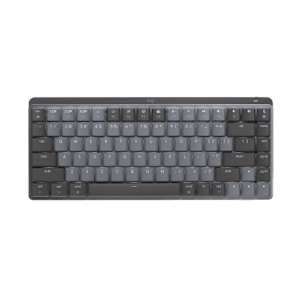
A comfortable, durable keyboard that does it all at a feel-good price.

Ready for trouble

Ready for trouble

The spill-resistant keyboard is durable enough to take what you can dish out —even if it’s your morning coffee.

Flat-out comfort

Flat-out comfort

You can type all day without fatigue thanks to the comfortable Zero Degree Tilt™ design.

How convenient

How convenient

This keyboard is at your service, giving you instant access to the features in Windows Vista®.

A comfortable keyboard that does it all at a feel-good price—and can handle spills, too.

Durable, spill-resistant design

Durable, spill-resistant design

Liquid drains out of the keyboard, so you don’t have to worry about ruining your investment with accidental spills.*

Zero Degree Tilt™

The flat keyboard design creates a natural typing feel that keeps you comfortable even after long hours. Typing can be tiring. Find out how Logitech helps you get comfortable.

Learn more.

Windows Vista™–ready

Windows Vista®–ready

The Start button gives you instant access to the features in Windows Vista®, as well as other Windows versions, for added convenience.

Compact, contemporary design

Compact, contemporary design

The compact, contemporary design gives your setup a sleek look.

* Tested under limited conditions (maximum 60 ml liquid spillage). Do not immerse keyboard in liquid.

Comfort is key with Logitech keyboards

Tap happiness

2 million keystrokes. Every day.

That’s how much the average person types every year, according to a study by Harvard. (Dennerlein 2006)

If you sit at your computer hour after hour, day after day, all those key presses can really add up. Fortunately, you can do something about it. Logitech keyboards have a variety of comfort features to help keep your body happy.


Comfort Wave Design: Curve + Wave + Palm Rest

Your fingers vary in length—but most keyboards treat them all the same. Our Wave keyboards have a gradual wave-shaped contour to support the varying lengths of your fingers and keep the pressure off your fingertips.

To keep you from having to twist into an unnatural position when you type, we threw in a curve. Gently curving rows of keys support the natural resting position of your hands without splitting the keyboard. After all, you shouldn’t have to relearn how to type to be comfortable.

A cushioned, contoured palm rest helps position your hands comfortably on the keyboard. Plus, it gives you a cushy place to rest your palms when you’re not typing.
See all Wave keyboards
Learn more about the Wave keyboard design

Zero Degree Tilt™: A real natural

Chances are your standard keyboard makes you take some non-standard positions. You see, traditional keyboards have higher keys in the back than the front, causing you have to angle your palms and fingers upward.

Our keyboards with Zero Degree Tilt™, on the other hand, have a flat design that lets your wrists stay in a more neutral position while you type. You won’t need to extend your wrists as much, either.


Zero in on keyboards with Zero Degree Tilt™

Perfectly PerfectStroke

Logitech PerfectStroke™ key system combines the benefits of a laptop keyboard with those of a stand-alone keyboard to give you a perfectly pleasant typing experience.

Clickety-clack. For those of you old enough to remember, it isn’t the sound of that old electric typewriter that you miss so much, it’s the way the keys felt under your fingers.


Learn more about PerfectStroke

To view this Product Gallery, please install the Adobe Flash plugin and enable JavaScript in your browser.
Click to play.

System Requirements

    • IBM® or Compatible PC with Windows® 98, 2000, Me, XP or Windows Vista® or Windows® 7
    • Available USB port


Warranty Information

  • 3-year limited hardware warranty

Package Contents

  • Logitech® Classic Keyboard 200

Part Number

  • PN 968019-0403
NewTouch™ Keyboard 200 (USB)

Questions? Answers? Software? It's all here.

Expert help
Read from thousands of FAQs.
Downloads
Download installation software, drivers, updates and more.
Support Community
Visit the Logitech community to interact with other users.

Get Support Now

Find a Store Near You

Enter your ZIP code to find stores that carry Logitech products.


Find a Product Online

This product is available at the following websites:


Have your say

Let us know what you think about our site.
Take our survey

Plug. Add. Forget.

The Logitech® Unifying receiver. Plug it. Forget it. Add up to six devices to it.
Learn More

NewTouch™ Keyboard 200 (USB)