


GBP 39.99

Add To Cart
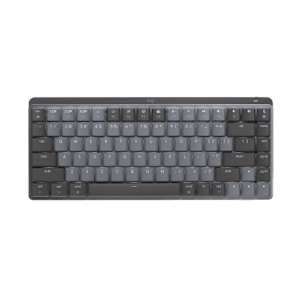
Wave Keyboard™

Groundbreaking comfort in a familiar shape.

Wave Keyboard - Curve appeal

Curve appeal

Your hands get cradled in comfort by the Comfort Wave Design—Wave + Curve + Palm Rest.

Wave Keyboard - All-access pass

All-access pass

You’ll do more, faster with one-touch controls and programmable keys for instant access to music, e-mail, and more.

Wave Keyboard - Height of comfort

Height of comfort

You can make yourself comfortable with folding legs that adjust the height to suit your needs.

Wave + Curve + Palm Rest = groundbreaking comfort in a familiar shape.

Wave-shaped key frame

Your fingers vary in length. So with its gradual wave-shaped contour, this keyboard supports the actual, varied lengths of your fingers. Learn more about how Logitech created the Comfort Wave Design.

Learn more.

Constant curve

Constant curve

The curved profile has a familiar shape and consistently sized keys, so you can type with comfort and confidence—without relearning how to type.

Cushioned, contoured palm rest

Cushioned, contoured palm rest

The palm rest helps position your hands comfortably on the keyboard—and offers a comfortable place to rest your palms when you’re not typing.

Adjustable keyboard height

Adjustable keyboard height

Three options for leg height allow you to adjust the keyboard to the height that feels most comfortable to you.

Optimized for Windows Vista

Optimised for Windows Vista®

Large, one-touch controls give you direct access to key Windows Vista® features—including Flip 3D, Zoom, Photo Gallery, and Gadgets.

Instant media access

Instant media access

Convenient one-touch controls give you instant access to volume and media playback. A dedicated button starts Media Center or Front Row (for Mac® computers).

Programmable keys

You’re in charge with programmable F-keys* you can easily customise to open your favourite applications, folders, or Web pages. Shortcuts? Hot keys? Programmable buttons? Find out more about SetPoint™ software.

Learn more.

Audio cable management

Audio cable management

You can keep headphone cords out of your way by routing them through the channel on the underside of the keyboard.

* Requires Logitech® SetPoint™ software (Windows) or Logitech® Control Center software (Mac OS® X), included with purchase and available for download at www.logitech.com/downloads.

Comfort Wave Design: The design of comfort

Typing is a big part of daily life. You do it automatically without really thinking about it. But, if you’re like most people, you’re feeling it. That’s what prompted us to rethink keyboard design and create a line of comfortable keyboards that don’t make you relearn how to type, unlike split keyboards.
See all Wave keyboards.

Watch the Wave video.

An idea right at our fingertips

We set out to create a keyboard that didn’t force you to conform to it—but rather one that conformed to you. The idea? A wave-shaped key frame with varying key heights to mirror the varying lengths of your fingers.

The keys hit by your little fingers would be the highest. Those hit by your middle fingers would be the shortest. You’d be in a more natural position so you wouldn’t need to twist and bend your hands and forearms to type.

Curve + Wave + Palm Rest

Not ones to rest on our laurels, we looked at all of our options. We tried linear designs. Curved designs. Palm rests and no palm rests. And all the possible combinations. When we put them to the test, the clear favorite was the keyboard with curve + wave + palm rest. The Wave keyboard was born.

Details, details

Unlike other curved keyboards, we used consistently sized keys. The subtle 5-degree curve was designed to let your hands open up and take a natural position instead of forcing your wrists to bend. And because each key is the same size and same distance from one another, you wouldn’t need to relearn how to type.

The cushioned, contoured palm rest mirrored the wave-shaped key frame. We added gentle indents to position your hands comfortably on the keyboard and used padded, soft upholstery so you’d have a cushy place to rest your palms when you’re not typing.

Comfort at last

To bring all this comfort to the achy masses, we had to completely redesign nearly every element of the assembly process and our packaging. But the results were worth it. Independent studies show that the Wave keyboards significantly reduce the four major points of discomfort—without causing a noticeable change in typing speed or accuracy.* It’s comfort made easy.

According to studies by two U.S. universities.

Logitech® SetPoint™ software. Your keyboard, customized.

Just the way you want it

Your keyboard isn’t just for typing. Many can launch Web pages and applications, control your media, and sometimes even show you what song is playing.

With Logitech® SetPoint™ software, you can not only change the function of your keys—you can customize all sorts of things to make your keyboard work better for you.

Download SetPoint now.

Hot keys at your service

Is that hot key not so hot in your eyes? You can easily change what it does with SetPoint. You simply select your keyboard, find the hot key you want to change, and pick what you want it to do.

So you can make that unloved button open a Web page, launch your favorite program, open a file or folder, and more. Or you can assign keystrokes to it.

F-keys that function your way

You don’t have to let your F-keys push you around either. You can program them to do what you want, too. You just choose the Function Key tab and make your changes.

Blocking the lock keys

No need to fear that Caps Lock key. SetPoint lets you disable the keys you’re afraid to accidentally hit—like all those lock keys, the Insert key, and the Windows® Start key.

Battery check-up

Keeping an eye on your battery level is easy—the Battery tab lets you see how much juice you’ve got left so you’ll never be left powerless.

Making special features more special

Whether your keyboard’s got zoom buttons, an LCD, a TouchDisc, or Media Pad, SetPoint lets you set things up the way you like them. You can speed up or slow down your zoom. Tell your LCD not to bug you with message alerts when you’re listening to music. Change the pointer speed on your TouchDisc. And much more.

Need more help? Get step-by-step instructions for your keyboard.

To view this Product Gallery, please install the Adobe Flash plugin and enable JavaScript in your browser.
Click to play.

System Requirements

  • PC
    • Windows® XP, Windows Vista®, Windows® 7
    • USB port
    • CD-ROM drive


  • Mac
    • Mac OS® X (10.2.8 or later)
    • Internet connection for software download
    • USB port
    • CD-ROM drive


Warranty Information

  • 5-year manufacturer's guarantee

Package Contents

  • Logitech® Wave Keyboard™
  • Plastic keyboard dust cover
  • CD with software, comfort guidelines, and help center
  • Quick Start guide
  • Full product support

Part Number

  • PN 920-000342
Wave Keyboard™

Questions? Answers? Software? It's all here.

Expert help
Read from thousands of FAQs.
Downloads
Download installation software, drivers, updates and more.

Get Support Now

Find a Store Near You

Enter your postal code to find stores that carry Logitech products.


Find a Product Online

This product is available at the following websites:


Spare Parts Store

If you've lost or broken a part of your Logitech product, here's where you can find a replacement piece. Happy shopping! Learn More

Free? Yes.

Spend GBP 55 and get free shipping. Just our way of saying thanks.

Wave Keyboard™