



Enjoy wireless access to precisely everything you want to do.
All-access pass
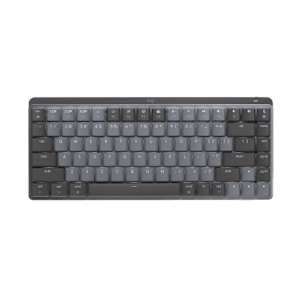
You can do more, faster with one-touch controls and programmable keys for instant access to music, e-mail, and more.
To the point
You’ll get right where you want to go with the smooth, precise tracking of the cordless laser mouse.
Off the leash
A reliable wireless connection gives you the freedom to work and play in more places—like your comfy couch.
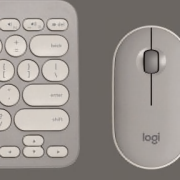
A cordless keyboard with easy-access controls and a high-performance laser mouse help you do precisely everything you want to do.
Easy-access controls
You can instantly open your favorite applications, such as your Internet browser, e-mail, or media library, with one-touch controls and hot keys.*
Programmable keys
You’re in charge with programmable F-keys you can easily customize to open your favorite applications, folders, or Web pages.* Shortcuts? Hot keys? Programmable buttons? Find out more about SetPoint™ software.
High-performance laser mouse
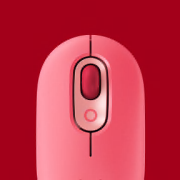
You’ll enjoy smooth, precise tracking on virtually any surface.** Side-to-side scrolling plus zoom and programmable buttons get you where you want to go faster. Curious about cursor control?
Windows Vista®-ready
You can make the most of the Start key and handy DocFlip controls of Vista. But no need to worry—it also gets along great with Windows® XP.
Wireless freedom
You can confidently work and play where you please. Encrypted, secure cordless technology ensures you a reliable connection with virtually no lags or dropouts. Learn more about Logitech wireless technologies.
Smart power management
Smart power management and a battery status indicator give you up to six months of keyboard battery life without surprises. Big on battery life? We are, too.
* Included software required for one-touch controls and programmable keys.
** The laser sensor does not work on glass or mirrors. If you’re looking for a mouse that will track on glass, click here.
Logitech® SetPoint™ software. Your keyboard, customized.
Just the way you want it
Your keyboard isn’t just for typing. Many can launch Web pages and applications, control your media, and sometimes even show you what song is playing.
With Logitech® SetPoint™ software, you can not only change the function of your keys—you can customize all sorts of things to make your keyboard work better for you.
Hot keys at your service
Is that hot key not so hot in your eyes? You can easily change what it does with SetPoint. You simply select your keyboard, find the hot key you want to change, and pick what you want it to do.
So you can make that unloved button open a Web page, launch your favorite program, open a file or folder, and more. Or you can assign keystrokes to it.
F-keys that function your way
You don’t have to let your F-keys push you around either. You can program them to do what you want, too. You just choose the Function Key tab and make your changes.
Blocking the lock keys
No need to fear that Caps Lock key. SetPoint lets you disable the keys you’re afraid to accidentally hit—like all those lock keys, the Insert key, and the Windows® Start key.
Battery check-up
Keeping an eye on your battery level is easy—the Battery tab lets you see how much juice you’ve got left so you’ll never be left powerless.
Making special features more special
Whether your keyboard’s got zoom buttons, an LCD, a TouchDisc, or Media Pad, SetPoint lets you set things up the way you like them. You can speed up or slow down your zoom. Tell your LCD not to bug you with message alerts when you’re listening to music. Change the pointer speed on your TouchDisc. And much more.
Need more help? Get step-by-step instructions for your keyboard.
Laser sensors: A controlling interest
Sensing the details
What does a mouse do? Fundamentally, it allows you to control your cursor. And the best measure of cursor control is the accuracy with which the mouse translates the movements you make with your hand.
How precise is your mouse? Logitech mice use advanced sensors to make sure that whether you’re clicking links, dragging text, or opening new apps—that whatever you’re doing—your computing experience is seamless.
We achieve precision by designing miniature sensors. These sensors take lots of little pictures of the surface below the mouse, interpret those pictures, and translate the movement your hand makes into movement on your screen.
Sensitive to your needs
Some people just need a mouse that works. Others need a mouse that can track on many surfaces. And gamers need a mouse that can give them game-changing precision at any hand speed.
Details, details
There are two kinds of sensors: optical and laser.
Mice with optical sensors track the surfaces beneath them using the available light and an LED lamp.
In 2004, Logitech introduced the first mouse with laser tracking. Laser sensors, compared to optical, produce far more illumination—both of the surface and of the contrast created by, literally, specs of dust on the surface—revealing a wealth of details even on glossy surfaces like highly polished wood. And that means your mouse can track motion precisely on many surfaces, without lags or jitter.
Glass. The final frontier.
Logitech mice that are built with Logitech® Darkfield Laser Tracking™ use the smallest possible details to create a micro-road map of the surface. That means these mice can track on glass.*
See all optical mice
See all laser mice
See all mice with Logitech® Darkfield Laser Tracking™
Gaming-grade control
If you’re an expert gamer, pixel-perfect tracking can mean the difference between victory and defeat. Our mice with gaming-grade laser sensors can track at speeds all the way up to 5000 dpi. So when the game is on the line, you’ll get maximum precision, blinding speed, and ultra-smooth tracking.
Track tested
We rigorously test all of our laser mice on a wide variety of surfaces to make sure your mouse is free of tracking flaws.
* Mice with Logitech® Darkfield Laser Technology cannot track on glass that is 4 mm thick or less, which is not much larger than the head of a pin.
The keys to wireless convenience.
You can control your computer from across the room. And be more productive and comfortable on the go. Logitech wireless keyboards give you the freedom to do more, in more places—without the clutter of cords.
From basic to Bluetooth, we’ve got plenty of options to choose from. But don’t worry—we’re here to untangle all the terminology and technology.
The power player: Advanced 2.4 GHz
For the best-of-the-best wireless connection, Logitech® Advanced 2.4 GHz wireless gives you the reliability of a cord with cordless convenience and freedom. Advanced 2.4 GHz wireless virtually eliminates delays and dropouts—even in the busiest wireless environments, such as a high-tech office.
In addition, Advanced 2.4 GHz wireless is designed to optimize battery power. (Many of our keyboards with Advanced 2.4 GHz wireless can offer up to three years of battery life.)
Your keyboard is automatically paired with your computer. So, you can use your keyboard with the most demanding applications and know that every keystroke you make will be carried out instantaneously. It uses less battery power than other wireless technologies, too
Fast and reliable: 2.4 GHz
The predecessor to Advanced 2.4 GHz wireless, our basic 2.4 GHz wireless keyboards deliver wireless convenience you can count on.
Thanks to its ability to transmit data in two directions, your keyboard can save power by turning itself off when your PC is dormant. Your keyboard can even sense if there’s wireless interference and change channels to establish the most secure connection.
Powering your wireless keyboard
More power to you
No one likes to run out of batteries. It’s a hassle. Scouring the house for new ones. Finding two that still have juice. Even making an extra trip to the store. At Logitech, we’re doing everything we can to make the hassle of replacing batteries hassle-free.
Batteries? What batteries?
Wireless keyboards let you avoid the inconvenience of cords. But unlike a corded keyboard (which is powered via USB and your computer), wireless keyboards use batteries, and batteries do run out of power.
Don’t even want to think about changing batteries? We’ve got just what you need. You can choose a keyboard with a battery life of 15 months—or even three years—and practically eliminate the hassle and expense of changing batteries.*
Learn more about the Logitech® Wireless Keyboard K350, featuring a three-year battery life.
Charge on
If rechargeable is more your style, we’ve got those too. You just put your keyboard in its charging base. It’s that easy. (Plus it’s good for the planet.)
Check out all of our rechargeable keyboards
* Battery life calculation based on an estimated 2,000,000 keystrokes/year in an office environment. User experience may vary.
System Requirements
-
- Windows® XP, Windows Vista® , Windows® 7
- USB port
- CD-ROM drive
Warranty Information
- 5-year limited hardware warranty
Package Contents
- Logitech® LX 310 Cordless Keyboard
- Logitech® Cordless Laser Mouse
- USB RF receiver
- 2 AA and 2 AAA alkaline batteries
- CD with software, comfort guidelines, and help center
- Quick Start Guide
- Full product support
Part Number
- PN 920-000390
Questions? Answers? Software? It's all here.
- Expert help
- Read from thousands of FAQs.
- Downloads
- Download installation software, drivers, updates and more.
- Support Community
- Visit the Logitech community to interact with other users.
Find a Store Near You
Enter your ZIP code to find stores that carry Logitech products.
Find a Product Online
This product is available at the following websites:
Have your say
Let us know what you think about our site.
Take our survey


Change Location