




USD 99.99

Add To Cart
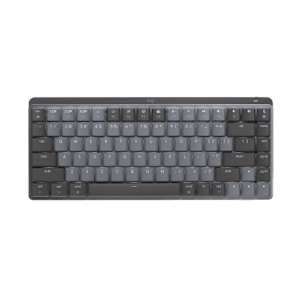
Wireless Desktop MK700

Where comfort and productivity go hand-in-hand.

Dip into comfort

Dip into comfort

With concave keys and a cushioned palm rest, this low-profile keyboard almost feels like it’s custom-made for you.

Power-packed

Power-packed

The three-year keyboard battery life is so hassle-free you just might forget it uses batteries at all.*

Scroll with it

Scroll with it

Hyper-fast scrolling—one spin and you may never go back to an ordinary scroll wheel.

* Keyboard battery life calculation based on an estimated 2,000,000 keystrokes/year in an office environment. User experience may vary. Mouse battery life may vary based on user and computing conditions.

Comfort and productivity go hand-in-hand thanks to concave keys, a cushioned palm rest, and a hyper-fast scrolling mouse.

Incurve keys™

Incurve keys™

Concave keys with softly-rounded edges position your fingers properly and invite your fingertips to glide from key to key—keeping you comfortable for hours

Low profile, longer key travel

Low profile, longer key travel

Not easily found on many low-profile and notebook keyboards, longer key travel improves comfort and your overall typing experience.

Cushioned palm rest

Cushioned palm rest

Your hands can relax—the cushioned palm rest feels so much better than hard plastic.

Sculpted mouse

Sculpted mouse

It positions your hand and fingers comfortably and naturally.

Three-year keyboard battery life

A three-year keyboard battery life and 12-month mouse battery life practically eliminates the need to replace batteries.* Big on battery life? We are, too.

Learn more.

Hyper-fast scrolling

You’ll fly through long documents and Web pages with just a flick of the nearly frictionless scroll wheel. Excited about hyper-fast scrolling?

Learn more.

LCD dashboard

LCD dashboard

It gives you at-a-glance icon status of your battery, Caps Lock, Scroll Lock, and Num Lock, so you won’t skip a beat while typing.

Advanced 2.4 GHz wireless

You can confidently work and play where you please. Encrypted, secure cordless technology ensures you a reliable connection with virtually no lags or dropouts. Learn more about Logitech wireless technologies.

Learn more.

* Keyboard battery life calculation based on an estimated 2,000,000 keystrokes/year in an office environment. User experience may vary. Mouse battery life may vary based on user and computing conditions.

Powering your wireless keyboard

More power to you

No one likes to run out of batteries. It’s a hassle. Scouring the house for new ones. Finding two that still have juice. Even making an extra trip to the store. At Logitech, we’re doing everything we can to make the hassle of replacing batteries hassle-free.


Batteries? What batteries?

Wireless keyboards let you avoid the inconvenience of cords. But unlike a corded keyboard (which is powered via USB and your computer), wireless keyboards use batteries, and batteries do run out of power.

Don’t even want to think about changing batteries? We’ve got just what you need. You can choose a keyboard with a battery life of 15 months—or even three years—and practically eliminate the hassle and expense of changing batteries.*


Learn more about the Logitech® Wireless Keyboard K350, featuring a three-year battery life.

Charge on

If rechargeable is more your style, we’ve got those too. You just put your keyboard in its charging base. It’s that easy. (Plus it’s good for the planet.)

Check out all of our rechargeable keyboards

* Battery life calculation based on an estimated 2,000,000 keystrokes/year in an office environment. User experience may vary.

Hyper-fast scrolling

One spin is all it takes

Scroll. Lift finger. Repeat. And repeat. And repeat.

Sound familiar? If you’re tired of inch-worming through long documents and Web pages, take hyper-fast scrolling for a spin to fly instead of crawl.


See all mice with hyper-fast scrolling

Scroll a lot?

Your spreadsheets and documents are getting longer. Your digital photo and music libraries are bursting at the seams. And you’re glued to long Web pages that have you scrolling and scrolling and …. To get through it all, you’re doing a whole lot of scrolling. We’re talking 26 feet of it in your average eight-hour day, according to a Logitech study.

That’s where hyper-fast scrolling comes in.


From zero to line 10,000 in 7 seconds

When you need to do some long-distance scrolling, hyper-fast scrolling unleashes the speed demon inside. What’s going on under the hood? The ratchet-scrolling mechanism you’re used to retracts so the wheel can spin with virtually no friction.

Seven seconds. That’s how long some of our scroll wheels spin freely—speeding you through hundreds of pages or thousands of rows.

And, oh yeah, it’s got precision handling too. With normal click-to-click scrolling, you can navigate your lists, slides, and images with the line-by-line control you need.


The keys to wireless convenience.

You can control your computer from across the room. And be more productive and comfortable on the go. Logitech wireless keyboards give you the freedom to do more, in more places—without the clutter of cords. From basic to Bluetooth, we’ve got plenty of options to choose from. But don’t worry—we’re here to untangle all the terminology and technology.

The power player: Advanced 2.4 GHz

For the best-of-the-best wireless connection, Logitech® Advanced 2.4 GHz wireless gives you the reliability of a cord with cordless convenience and freedom. Advanced 2.4 GHz wireless virtually eliminates delays and dropouts—even in the busiest wireless environments, such as a high-tech office.

In addition, Advanced 2.4 GHz wireless is designed to optimize battery power. (Many of our keyboards with Advanced 2.4 GHz wireless can offer up to three years of battery life.)

Your keyboard is automatically paired with your computer. So, you can use your keyboard with the most demanding applications and know that every keystroke you make will be carried out instantaneously. It uses less battery power than other wireless technologies, too

Check out all of our Advanced 2.4 GHz wireless keyboards.

Fast and reliable: 2.4 GHz

The predecessor to Advanced 2.4 GHz wireless, our basic 2.4 GHz wireless keyboards deliver wireless convenience you can count on.

Thanks to its ability to transmit data in two directions, your keyboard can save power by turning itself off when your PC is dormant. Your keyboard can even sense if there’s wireless interference and change channels to establish the most secure connection.

Have a look at all 2.4 GHz wireless keyboards.

To view this Product Gallery, please install the Adobe Flash plugin and enable JavaScript in your browser.
Click to play.

System Requirements

  • Windows-based PC only
    • Windows® XP, Windows Vista® or Windows® 7
    • USB port
    • CD-ROM drive
    • Internet connection for software driver download


Warranty Information

  • 5-years limited hardware warranty

Package Contents

  • Keyboard
  • Mouse
  • USB 2.4 GHz mini-receiver
  • 4 AA alkaline batteries
  • CD with software
  • User documentation

Part Number

  • PN 920-001763
Wireless Desktop MK700

Questions? Answers? Software? It's all here.

Expert help
Read from thousands of FAQs.
Downloads
Download installation software, drivers, updates and more.
Support Community
Visit the Logitech community to interact with other users.

Get Support Now

Find a Store Near You

Enter your ZIP code to find stores that carry Logitech products.


Find a Product Online

This product is available at the following websites:


Free? Yes.

Spend $75 and get free ground shipping. Just our way of saying thanks.

Plug. Add. Forget.

The Logitech® Unifying receiver. Plug it. Forget it. Add up to six devices to it.
Learn More

Wireless Desktop MK700