





Powering your wireless keyboard
More power to you
No one likes to run out of batteries. It’s a hassle. Scouring the house for new ones. Finding two that still have juice. Even making an extra trip to the store. At Logitech, we’re doing everything we can to make the hassle of replacing batteries hassle-free.
Batteries? What batteries?
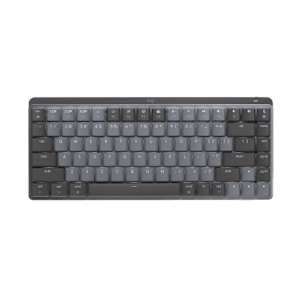
Wireless keyboards let you avoid the inconvenience of cords. But unlike a corded keyboard (which is powered via USB and your computer), wireless keyboards use batteries, and batteries do run out of power.
Don’t even want to think about changing batteries? We’ve got just what you need. You can choose a keyboard with a battery life of 15 months—or even three years—and practically eliminate the hassle and expense of changing batteries.*
Learn more about the Logitech® Wireless Keyboard K350, featuring a three-year battery life.
Charge on
If rechargeable is more your style, we’ve got those too. You just put your keyboard in its charging base. It’s that easy. (Plus it’s good for the planet.)
Check out all of our rechargeable keyboards
* Battery life calculation based on an estimated 2,000,000 keystrokes/year in an office environment. User experience may vary.
Logitech® Unifying receiver
And it’s easy to add a compatible wireless keyboard or mouse to the same receiver. Build your ideal combo. Add something. Replace something. It’s as simple as can be and you’ll use only one USB port.
Learn more about Unifying.
Uniting your setup
Your laptop is convenient. You use it on the couch, in the kitchen, at the coffee shop—wherever you want. Logitech makes your laptop as comfortable as it is convenient with portable mice and notebook-ready keyboards.
The Logitech® Unifying receiver takes convenience a step further.
The Logitech® Unifying receiver is a tiny, leave-in wireless receiver. Smaller than most coins, the Unifying receiver not only makes it easy to use a wireless keyboard, mouse, or number pad, it also works with up to six devices.
Plug it in
With the tiny wireless receiver, there’s no need to plug and unplug when you’re on the move. Or deal with the hassle of multiple receivers. The tiny Logitech® Unifying receiver stays in your notebook and lets you add devices as you need them.
See all mice and keyboards with the Unifying receiver
Forget about it
The Unifying receiver is small and always ready. So small, in fact, you can leave it plugged into your USB port when you’re on the move—without worrying about breaking or losing it.
Add to it
It’s fast and easy to add a compatible wireless mouse, keyboard, or number pad to your receiver. You can mix, match, upgrade, or replace up to six devices—now or in the future—using just one USB port.
To connect a new device, you simply open the connection software, click “Pair new device”, and turn the device off and on. That’s it.
Download Connection software now.
A tiny dynamo
The Unifying receiver packs plenty of power. Built with Logitech® Advanced 2.4 GHz wireless connectivity, Logitech mice with the Unifying receiver give you the reliability of a cord—with the freedom of cordless. You’ll enjoy fast data transmission with virtually no delays or dropouts.
Plug it. Forget it. Add to it. You’ve got the Logitech Unifying receiver.
http://www.logitech.com/index.cfm/681/&cl=us,en
Find a Store Near You
Enter your ZIP code to find stores that carry Logitech products.
Find a Product Online
This product is available at the following websites: